Disk cleanup for Mac,
done safely.
MyMacStorage is a native Mac storage cleaner and disk space analyzer. It maps your whole disk in one scan, shows exactly what fills it, then clears what you don’t need, safely. Nothing is deleted. Everything goes to the Trash.
$19.99 onceOne key for Mac and WindowsmacOS 14 and later
Your Mac storage bar,
finally explained.
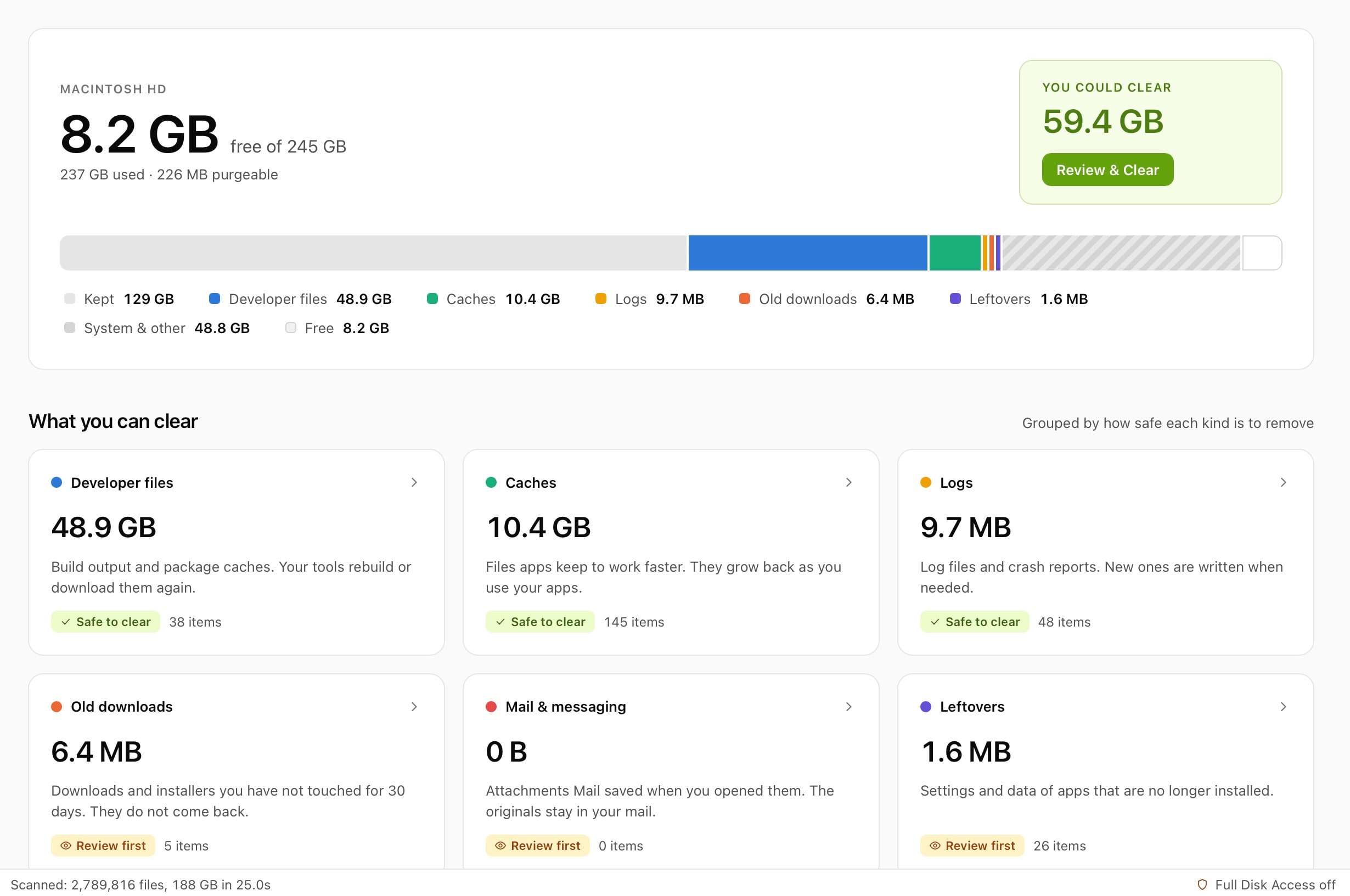
MyMacStorage takes the storage bar from System Settings and names every coloured slice, so you know what to keep and what to clear.
Macintosh HD
145.0 GB free of 494.4 GB
- Kept
- Developer files
- Old downloads
- Caches
- Duplicates
- Logs
- Leftovers
Ready. 70.5 GB to clear.
Most Mac disk space analyzers stop at a chart. MyMacStorage ties every slice to the files behind it, so you go from “what is this?” to cleared in the same window.
Six Mac cleanup tools, one scan.
Analyze disk usage, find large files and clean up your Mac from one window. What you keep is grey. What you could clear is lime.
One scan, and your whole drive on one screen.
What’s taking up space on your Mac?
A full Mac often hides gigabytes in places Finder never shows. MyMacStorage finds them and sorts them by how safe they are to clear.
Safe to clear
macOS and your apps rebuild these files whenever they need them.
Caches and logs
Browsers, apps and macOS write caches and logs all day. Over months, they quietly grow into gigabytes. Clearing them frees space without touching your documents.
Developer files
Xcode DerivedData, old simulators, node_modules folders and build output pile up fast. MyMacStorage groups them and adds them up, so you see what each cleanup frees.
Old installers
Downloaded .dmg and .pkg files stay on your disk long after you install the app. MyMacStorage finds every leftover installer, wherever it hides.
Worth a second look
These files may still matter to you, so MyMacStorage shows them clearly and lets you decide.
System Data
macOS lumps caches, logs and app support files into one grey slice. MyMacStorage breaks that slice open and names what sits inside.
Large, forgotten files
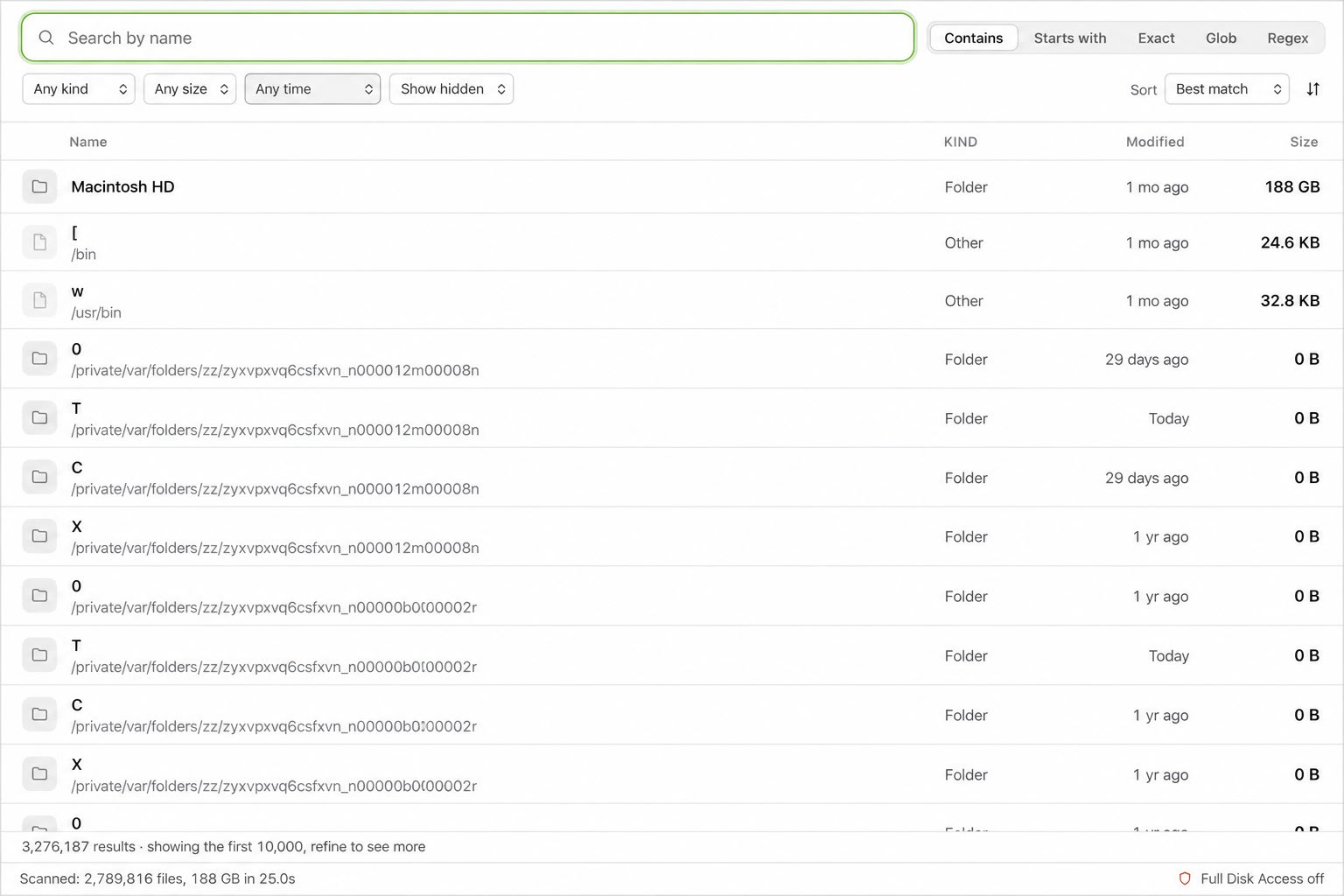
The Space tool lists your biggest files and folders first. Old video exports, virtual machines and backup archives rise straight to the top.
Duplicate files
MyMacStorage matches duplicates byte for byte, not just by name. You keep one copy and move the rest to the Trash.
App leftovers
Dragging an app to the Trash leaves its support files behind. The Applications tool shows each app’s full size, plus what removed apps left behind.
Clean up your Mac in three steps.
No settings to learn. No Terminal commands. Just scan, review and clear.
- 1
Scan your disk
Open MyMacStorage and start one scan. It maps every folder on your Mac, hidden ones included, in a single pass.
- 2
Review what it finds
Browse the results tool by tool. Every item shows its size and location, so you decide what goes.
- 3
Clear it to the Trash
Click Clear, and MyMacStorage moves the files to the Trash. Changed your mind? Undo puts the whole cleanup back.
Better than the built-in storage tools.
macOS tells you your disk is full. MyMacStorage tells you why, then fixes it.
MyMacStorage vs macOS Storage settings
| Feature | macOS | MyMacStorage |
|---|---|---|
| Breaks down System Data | No | |
| Lists your biggest files and folders | Partly | |
| Finds duplicates byte for byte | No | |
| Finds leftovers from removed apps | No | |
| Undoes a whole cleanup | No |
MyMacStorage vs subscription cleaners
Many Mac cleanup tools charge you every year and ask you to trust them with your files. MyMacStorage costs $19.99 once, runs entirely on your Mac and never uploads a filename.
You get every future update without a subscription, and one key covers the Windows version too.
A Mac storage cleaner that’s safe by design.
Two promises the app keeps, whatever you click.
Nothing is deleted.
Every cleanup moves files to the Trash, never straight to oblivion. The worst case is dragging them back out.
- Undo puts a whole cleanup back
- You review every item first
Nothing leaves your Mac.
Scanning, hashing and duplicate matching all happen on your Mac. Not a single filename is uploaded.
- No account to make
- No sync, no analytics
- Only your licence is checked
Built for every Mac.
From a 256 GB MacBook Air to a packed Mac Studio.
MacBook Air
Small SSDs fill up fast. MyMacStorage frees space on your MacBook Air in minutes, so macOS updates install and your photos keep syncing.
MacBook Pro
Developers and creators lose gigabytes to build caches, simulators and render files. One scan finds them all, so you never hunt folder by folder.
iMac, Mac mini and Mac Studio
Desktop Macs collect years of downloads, duplicates and forgotten projects. MyMacStorage sorts them by size, so the biggest wins come first.
Pay once. Keep it.
No subscription. Every update is included.
$19.99
One-time payment
- All six tools, no limits
- One key for Mac and Windows
- Every future update included
- No account, no subscription
Mac disk cleanup questions, answered.
What is the best way to do a disk cleanup on a Mac?
Find out what fills your disk first, then clear it in order of size. MyMacStorage does both: it scans your whole Mac, names every category and moves what you choose to the Trash.
How do I free up disk space on my Mac quickly?
Clear caches, old installers and duplicate files first, because you rarely need them. Then review your largest files. One scan lists all of these, so a typical cleanup takes minutes.
What is System Data on a Mac, and can I clear it?
System Data is a catch-all for caches, logs, app support files and local snapshots. macOS manages part of it, but caches and logs often grow unchecked. MyMacStorage shows what sits inside and lets you clear the parts that are safe to remove.
How is it different from other Mac cleanup tools?
MyMacStorage shows before it clears. You see every file with its size and location, and nothing leaves your Mac. Each cleanup goes to the Trash with a one-click undo, and you pay once instead of every year.
Why is my Mac storage still full after I empty the Trash?
Big files often sit outside the folders you check: caches, developer files, duplicates and app leftovers. Run one scan in MyMacStorage to see where the space really went.
Does cleaning up my Mac make it faster?
It helps when your disk is nearly full, because macOS needs free space for swap files and updates. A cleanup won’t make a fast Mac faster, but it stops a full disk from slowing it down.
How often should I clean up my Mac?
A quick cleanup every month or two keeps most Macs healthy. Caches and downloads grow back, so run a scan after big projects or macOS updates.
Can I undo a cleanup?
Yes. Undo puts a whole cleanup back in one click. Your files also stay in the Trash until you empty it yourself.
Is it safe to delete caches on a Mac?
Yes, in most cases. Apps and macOS rebuild caches when they need them. MyMacStorage still moves them to the Trash first, so you can restore anything an app misses.
Will it delete anything without asking?
No. You review every item first, and everything goes to the Trash, so you can always drag it back.
Does it upload my files or filenames?
No. Scanning, hashing and duplicate matching all run on your Mac. Only your licence key is checked online.
What does the $19.99 licence include?
All six tools with no limits, the Mac and Windows versions, and every future update. You pay once, with no account and no subscription.
Is there a free trial?
No. MyMacStorage costs $19.99 once, with no trial and no subscription. Every future update is included.
Which Macs and macOS versions are supported?
Every Mac running macOS 14 Sonoma or later, including MacBook Air, MacBook Pro, iMac, Mac mini and Mac Studio, on both Apple silicon and Intel.
Is it a WizTree alternative for Mac?
Yes. WizTree runs only on Windows. MyMacStorage gives you a fast disk space analyzer on macOS, adds cleanup tools, and one licence covers both Mac and Windows.
Can I use one licence on Windows too?
Yes. One key works with both the Mac and Windows versions.
Is it a subscription?
No. You pay $19.99 once and every future update is included.
Prefer to do it by hand? Read our guide on how to free up disk space on a Mac.
Give your Mac room to breathe.
One scan shows you everything filling your Mac. $19.99 once, and it’s yours.